Home » Blog » New balance validation process in SAP Group Reporting
Reading time: 7 minutes
The 2025 release delivers a fundamentally redefined balance validation process for the preparation of the financial statements, which are both in Data monitor as well as in the Consolidation monitor is being used.
Balance validation is a crucial part of financial statement preparation. It is performed in both the data monitor and the consolidation monitor. The goal is to ensure consistent data across the various consolidation levels. The current release fundamentally redefines this process. Below, we present the most important changes and benefits of the new balance validation process. First, however, it should be emphasized that the new balance validation process represents a complete technological overhaul. To use the process, a migration of the rules to the new technology is necessary. After the migration, the previous validation measures can no longer be used.
New apps
The new process also includes new apps. We will present these in detail in a separate article, but provide a brief overview here.
Manage balance validation rules and groups – Group reporting
This app is used to manage and structure test rules. These are no longer assigned to methods, but to groups of test rules, which are then ultimately assigned to measures.
Assign rule group for balance validation – Group reporting
As mentioned previously, we group audit rules into audit rule groups. In this app, these groups are assigned to measures in conjunction with periods and consolidation units.
Import/export current settings – Group reporting
This app allows you to export and import test rules, test rule groups, and their mappings between systems. Dependent objects such as selections can also be transferred. The new feature is that mappings are now also handled via export/import and no longer require transport.
Run balance validation and display results – Group reporting
This app allows you to perform balance validations centrally and analyze the results. The option to perform balance validations in the data monitor, for example, remains available.
Balance validation at the individual financial statement level (Table ACDOCA)
Previously, it was only possible to validate data after it had been released from the individual financial statements (table ACDOCA) for consolidated financial statements (table ACDOCU). The data basis for validation was therefore table ACDOCU in consolidated financial statements. With the new release, you can validate individual financial statement data even before the data release makes it available for consolidated financial statements. This can be particularly helpful in accelerating the closing process and improving data quality. As a result, the validation process starts significantly earlier, and the need for corrections can be identified at an early stage – at least for integrated companies.
Multiple balance validation measures for staggered closing
Previously, only three balance validation measures were available: one for reported data, one for adjusted reported data, and one for consolidated data. The new balance validation process now allows for further subdivision of balance validation measures to enable staggered period-end closing. For example, balance validation for reported data can be divided into two steps: first, the balance sheet and income statement are validated, followed by the notes to the financial statements. The document types serve as the criterion for this subdivision.
Reliable consolidated financial statements begin with smart financial consolidation using the right software, e.g., from SAP.
New operands will be made available with the 2025 release:
Final balance for the previous year
This operand allows you to select the cumulative amount for all periods of the previous year. This makes it possible to directly compare values of the current fiscal year with those of the previous year. For balance sheet items that are carried forward to themselves, this was previously possible using the values in the balance carryforward sub-item. However, validation is now also possible for net income, profit and loss statement items, or a specific sub-item in the balance sheet.
QTD amount
This operand selects the cumulative amount from the beginning of the current quarter up to the specified period. This allows for targeted quarterly comparisons.
YTD/QTD quantity
This operand now allows quantities to be validated on a year-to-date or quarter-to-date basis. This makes it possible to check quantities on a period-specific basis, in addition to amounts.
Export and import mappings
Audit rules are grouped into audit rule groups, to which measures are then assigned. These assignments are not made in Customizing, but in the new app "Assign Rule Group for Balance Validation". Combined with the export and import of these assignments, this significantly increases the flexibility of business departments, allowing them to work more independently of the traditional transport system. In Customizing itself, only the measures need to be created and assigned in the monitors.
Regular groups
In the new balance validation framework, validation rules are arranged hierarchically in a tree structure. This begins with a group, which can contain any number of subgroups. Validation rules are then assigned to these lower levels. Compared to the old framework, it is now possible to arrange rule groups at more than two levels. It is also still possible to reference other groups within a group. This can significantly reduce maintenance effort, as changes are inherited through referenced structures.
For example:
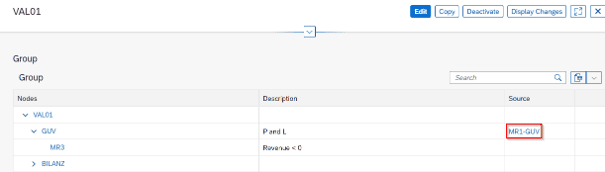
In the following group, the node "GUV" refers to the source MR1-GUV.
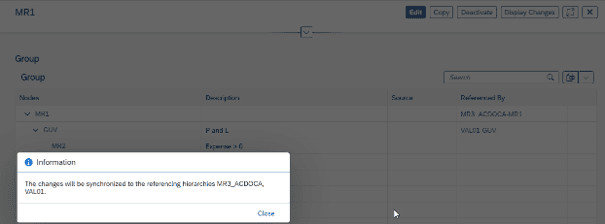
A change in the source MR1-GUV, such as adding another check rule, will automatically add this check rule to the group "VAL01" as well. When such a change is saved, a corresponding message is displayed.
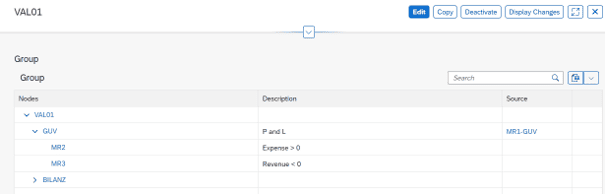
As a result, the group “VAL01” also contains the newly added check rule, without you having to explicitly change the group:
In addition to these extensive innovations, there are others:
The language of the description can now be maintained in multiple languages.
Enhanced grouping options for test rules: You can now use up to six characteristics instead of the previous three.
And finally ...
The new balance validation process introduces several significant innovations. In particular, the integration with the individual financial statements and the ability to validate data directly in the ACDOCA table can help improve the closing process and data quality. The option to reuse subsets of audit rules also simplifies the maintenance process within the system and enhances clarity.
However, these innovations also entail implementation effort, as a migration from the old to the new framework is required. Furthermore, adjustments to permissions may be necessary, since a number of new apps are planned for the new balance validation process.
The control level is still assigned at the level of the audit rules. If an audit rule is to be executed as a warning during the year and as an error at year-end, you must still create two separate audit rules: one with the control level "Warning" and one with the control level "Error".